How to intall the BookBetterDirect browser extension

Get up and running in as little as 3 seconds. 

Save time, money, be sure and get the best deal. 

Plus you support the local economy by booking direct.

Start to Book Better Direct today!

It looks like you are using
the Firefox Web Browser.

It looks like you're using
the Chrome Web Browser.

It looks like you're using
the Edge Web Browser.

It looks like you're on
a tablet or mobile.

Start finding direct hotel deals, by clicking the button below. You’ll be taken to the official browser’s app store.

Arrow to try out the BookBetterDirect Chatbot

BookBetterDirect™ Browser Extension is available for Chrome, Edge and Firefox desktop browser.

How to install, deactivate and remove.

What is a browser extension?

A browser extension is a small program that adds new functionality to your browser. Much like apps on your phone, they improve productivity, create shortcuts and in general make your life easier. There are thousands of usefull browser apps. Think of Google Translate, Grammarly or Honey with over millions of users.

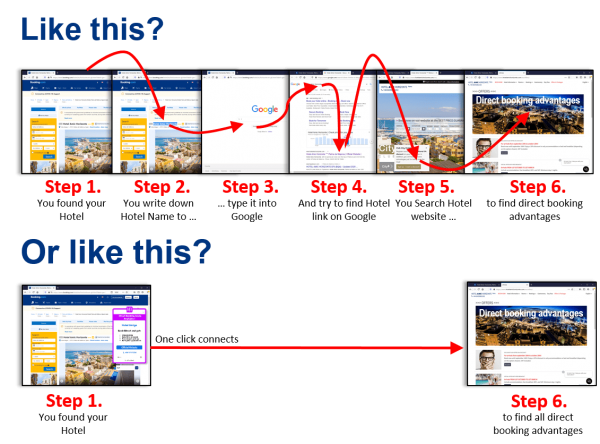
How to install the Book Better Direct browser app extension?

To install the BBD extension it takes exactly 3 seconds and it’s for Window or Mac the same. Click on the button below to install the Browser App. Watch one of the videos to see how it works. If you want to know how to switch off the Browser extension, scroll further down.

Chrome browser on Windows & Mac

  1. Follow this link to install BookBetterDirect on Chrome.
  2. Click on Add to Chrome and then Add extension.
  3. Book Better Direct is successfully installed!

Firefox browser on Windows & Mac

  1. Follow this link to install BookBetterDirect on Firefox.
  2. Click on Add to Firefox and then Add extension.
  3. Book Better Direct is successfully installed!

Edge browser on Windows

  1.  First, click the three horizontal dots in the upper right corner of the edge browser to open the menu.
  2. Then, click “Extensions” in the menu.
  3. Enable the “Allow extensions from other stores” switch in the lower left-hand corner of the Extensions page that appears.
  4. Microsoft will warn you that it hasn’t verified the extensions in the Chrome Web Store or anywhere else online. Click “Allow” to continue.
  5. Follow this link to install BookBetterDirect on Firefox.
  6. Click on Add to Chrome and then Add extension.
  7. Book Better Direct is successfully installed!

How to deactivate the browser app.

You can temporarily deactivate the browser app by going through the following 3 easy steps. The procedure is for all browsers more or less the same.

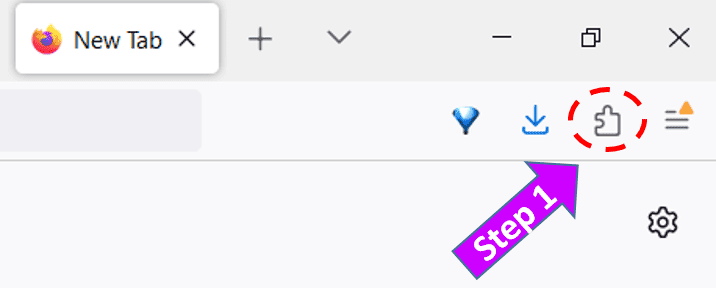
Have a look at the top right corner of your browser screen. You will see a puzzle piece like this.

How to intall the BookBetterDirect browser extension

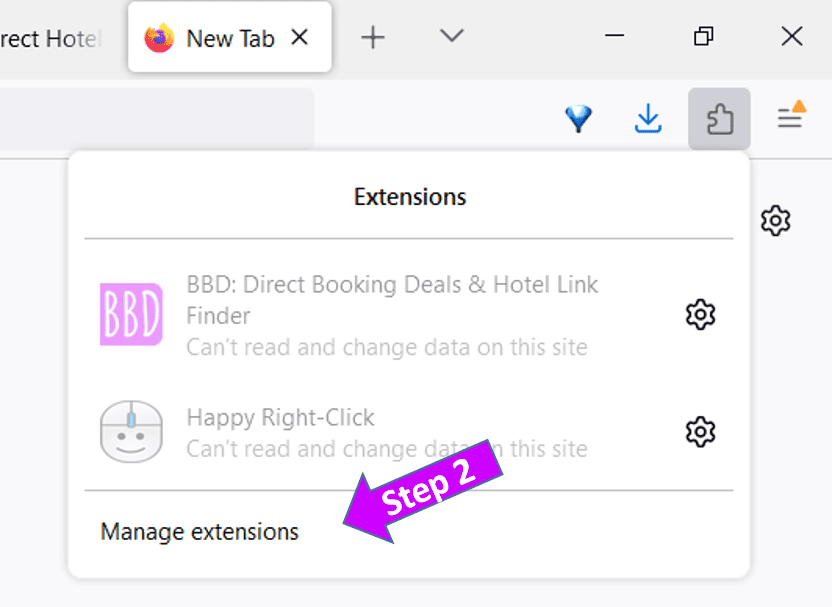
Step 1: Click on the puzzle piece. A menu will open.

Step 2: Now you click on “Manage extension”.

How to intall the BookBetterDirect browser extension

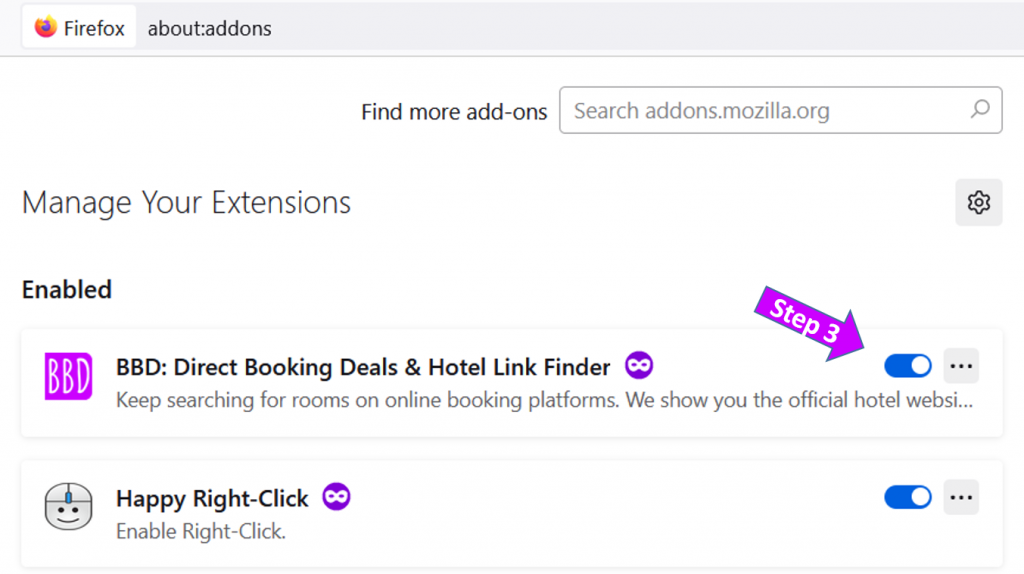
Step 3: To turn off the BBD browser extension toggle the switch so that is turns grey.

You can always later switch it on again, by following the same procedure.

How to remove the browser app.

Step 1:
The easiest way for you to remove the browser app is by clicking on the button bellow. You are taken to the correct app store.

Step 2:
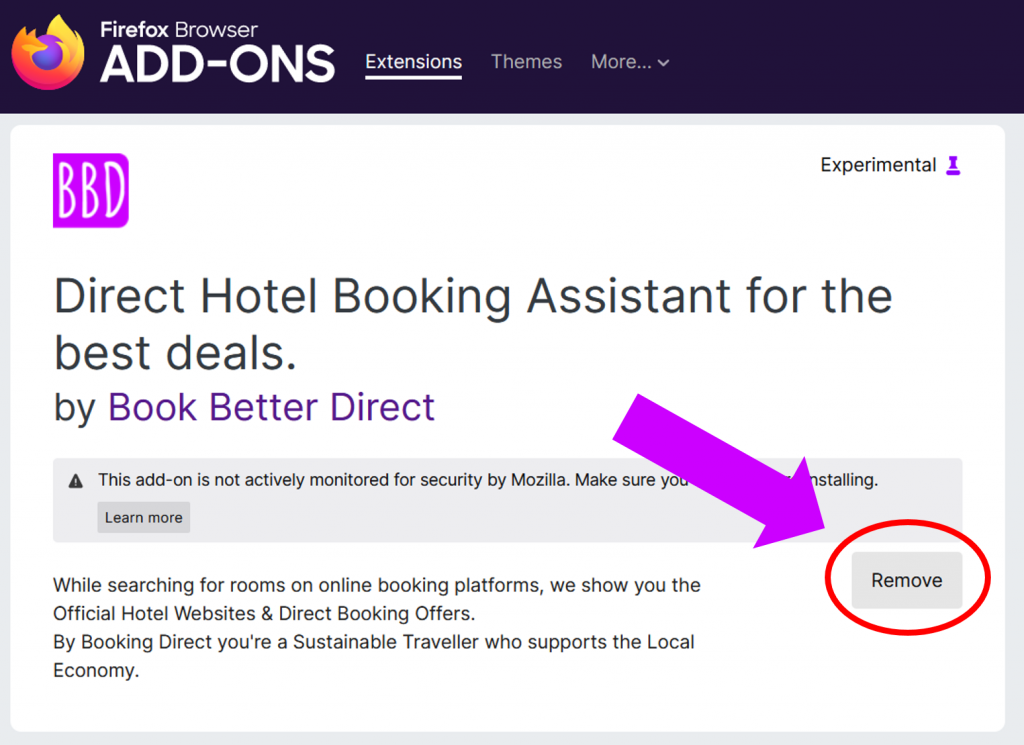
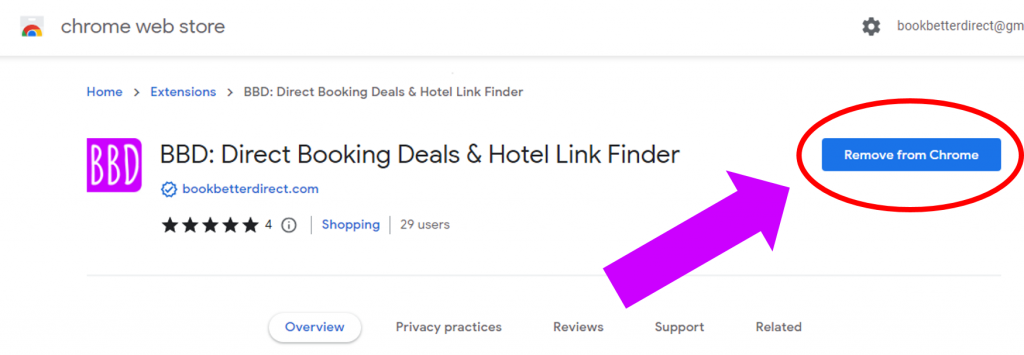
In the app store you have to click on the button “Remove”. It’s either a blue or a grey button.

Step 2:
In the app store you have to click on the button “Remove”. It’s either a blue or a grey button depending on your browser.

How to intall the BookBetterDirect browser extension